arduino ADC 가변저항 두개를 이용해서 XY 축 이동 예제
과제 :아두이노에서 가변저항을 이용하여 들어오는 analog 값을 digital로 연산하는 ADC를 좀더 쉽게 이해하기 위해 제작
아두이노에서 가변저항으로 들어오는 값을 가지고 PC에서 만든 processing 어플과 연동 함.
X,Y값을 보내서 X,Y 평면위에서 동작하는 방식을 구현함.
회로구성
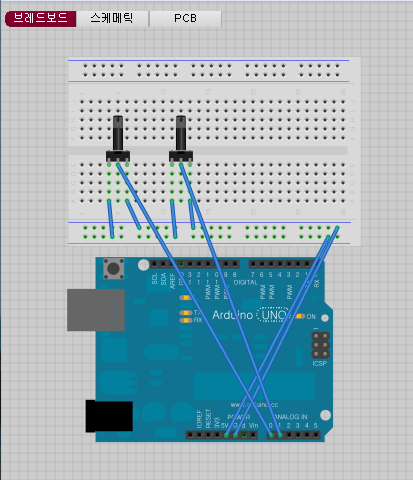
Source code (arduino)
void setup()
{
Serial.begin(9600);
}
int x = 100, y = 100;
int x_backup = 100, y_backup=100;
void loop(){
//adc0 adc1 read
x = analogRead(A0);
y = analogRead(A1);
if((abs(x - x_backup)>10)|| (abs(y-y_backup)>10))
{
//write adc0 adc1
if(x <100) x= 100;
if(x >1000) x= 999;
if(y <100) y= 100;
if(y >1000) y= 999;
Serial.print(“x”);
Serial.print(x);
Serial.print(“y”);
Serial.print(y);
Serial.println();
delay(30);
x_backup = x;
y_backup = y;
}
}
Source code (Processing)
base code : Demos -> Performance -> DynamicParticlesImmediate
serial read and write : http://www.processing.org/reference/libraries/serial/
PImage sprite;
import processing.serial.*;
Serial myPort; // The serial port
int npartTotal = 10000;
int npartPerFrame = 25;
float speed = 1.0;
float gravity = 0.05;
float partSize = 20;
int partLifetime;
PVector positions[];
PVector velocities[];
int lifetimes[];
int fcount, lastm;
float frate;
int fint = 3;
void setup() {
size(1024, 1024, P3D);
frameRate(120);
sprite = loadImage(“sprite.png”);
partLifetime = npartTotal / npartPerFrame;
initPositions();
initVelocities();
initLifetimes();
// Writing to the depth buffer is disabled to avoid rendering
// artifacts due to the fact that the particles are semi-transparent
// but not z-sorted.
hint(DISABLE_DEPTH_MASK);
// Testing some hints
//hint(DISABLE_TRANSFORM_CACHE);
//hint(ENABLE_ACCURATE_2D);
//test for serial input by sulac
// List all the available serial ports
println(Serial.list());
// Open the port you are using at the rate you want:
myPort = new Serial(this, Serial.list()[1], 9600);
// end test for serial input by sulac
}
int x = 0, x_posi = 0 ;
int y = 0, y_posi = 0;
String sx;
String sy;
void draw () {
background(0);
// test for serial input by sualc
String inBuffer = null;
if(myPort.available() > 0) {
inBuffer = myPort.readStringUntil(10);
if (inBuffer != null) {
String myString = new String(inBuffer);
print(“inputdata : “);
println(myString);
x_posi = myString.indexOf(‘x’);
println(x_posi);
y_posi = myString.indexOf(‘y’);
println(y_posi);
sx = myString.substring(x_posi+1, y_posi);
sy = myString.substring(y_posi+1, y_posi+4);
x = Integer.parseInt(sx);
print(“x”);
println(x);
y = Integer.parseInt(sy);
print(“y”);
println(y);
}
}
// end test for serial input by sulac
for (int n = 0; n < npartTotal; n++) {
lifetimes[n]++;
if (lifetimes[n] == partLifetime) {
lifetimes[n] = 0;
}
if (0 <= lifetimes[n]) {
float opacity = 1.0 - float(lifetimes[n]) / partLifetime;
if (lifetimes[n] == 0) {
// Re-spawn dead particle
// positions[n].x = mouseX;
positions[n].x = x;
//positions[n].y = mouseY;
positions[n].y = y;
float angle = random(0, TWO_PI);
float s = random(0.5 * speed, 0.5 * speed);
velocities[n].x = s * cos(angle);
velocities[n].y = s * sin(angle);
} else {
positions[n].x += velocities[n].x;
positions[n].y += velocities[n].y;
velocities[n].y += gravity;
}
drawParticle(positions[n], opacity);
}
}
fcount += 1;
int m = millis();
if (m - lastm > 1000 * fint) {
frate = float(fcount) / fint;
fcount = 0;
lastm = m;
println(“fps: “ + frate);
}
}
void drawParticle(PVector center, float opacity) {
beginShape(QUAD);
noStroke();
tint(255, opacity * 255);
texture(sprite);
normal(0, 0, 1);
vertex(center.x - partSize/2, center.y - partSize/2, 0, 0);
vertex(center.x + partSize/2, center.y - partSize/2, sprite.width, 0);
vertex(center.x + partSize/2, center.y + partSize/2, sprite.width, sprite.height);
vertex(center.x - partSize/2, center.y + partSize/2, 0, sprite.height);
endShape();
}
void initPositions() {
positions = new PVector[npartTotal];
for (int n = 0; n < positions.length; n++) {
positions[n] = new PVector();
}
}
void initVelocities() {
velocities = new PVector[npartTotal];
for (int n = 0; n < velocities.length; n++) {
velocities[n] = new PVector();
}
}
void initLifetimes() {
// Initializing particles with negative lifetimes so they are added
// progressively into the screen during the first frames of the sketch
lifetimes = new int[npartTotal];
int t = -1;
for (int n = 0; n < lifetimes.length; n++) {
if (n % npartPerFrame == 0) {
t++;
}
lifetimes[n] = -t;
}
}
과제 결과 동영상
Java string관련 Serial로 들어오는 데이터를 string to integer로 변환하는데 처음하는거라 시간이 오래 걸렸다.
예제를 볼수도 있지만 완벽한 코드가 아니라 사용할 때는 보완을 해야 할듯하다.
현재는 Arduino에서 정해진 싸이즈로만 보내도록 하여 문제 해결하였다.
http://developer.android.com/reference/java/lang/String.html