초음파 센서로 거리 측정해서 프로세싱 에니메이션 연동하기.
구현 방향 : 초음파센서로 거리를 측정해서 processing으로 거리에 따른 이펙트를 보여준다.
참고한 code
Ultrasonic
UltrasonicDisplayOnTerm
using processing example
Topics - >Geometry -> SpaceJunk
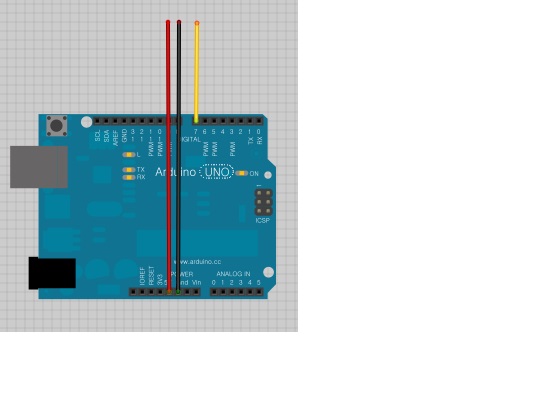
회로도 (초음파 센서가 Fritzing에 없어서 그냥 선만 뺐음)
SIG에 7번 핀을 연결하고 VDD및 GND를 연결하면 됨
시현 동영상
Source code
arduino
#include
\ \ Ultrasonic ultrasonic(7);\ void setup()\ {\ Serial.begin(9600);\ }\ void loop()\ {\ ultrasonic.MeasureInCentimeters();\ if(ultrasonic.RangeInCentimeters != 0)\ Serial.println(ultrasonic.RangeInCentimeters);\ delay(30);\ }
processing
/**
* Space Junk
* by Ira Greenberg (zoom suggestion by Danny Greenberg).
*
* Rotating cubes in space using a custom Cube class.
* Color controlled by light sources. Move the mouse left
* and right to zoom.
*/
/////////////////////////////////////////////////////
//test by sulac
import processing.serial.*;
Serial myPort; // The serial port
/////////////////////////////////////////////////////
// Used for oveall rotation
float angle;
// Cube count-lower/raise to test performance
int limit = 500;
// Array for all cubes
Cube[] cubes = new Cube[limit];
void setup() {
size(1000, 500, P3D);
background(0);
noStroke();
// Instantiate cubes, passing in random vals for size and postion
for (int i = 0; i < cubes.length; i++){
cubes[i] = new Cube(int(random(-10, 10)), int(random(-10, 10)),
int(random(-10, 10)), int(random(-140, 140)),
int(random(-140, 140)), int(random(-140, 140)));
}
////////////////////////////////////////////////
//test for serial input by sulac
// List all the available serial ports
println(Serial.list());
// Open the port you are using at the rate you want:
myPort = new Serial(this, Serial.list()[1], 9600);
// end test for serial input by sulac
////////////////////////////////////////////////
}
void draw(){
background(0);
fill(200);
// Set up some different colored lights
pointLight(51, 102, 255, 65, 60, 100);
pointLight(200, 40, 60, -65, -60, -150);
// Raise overall light in scene
ambientLight(70, 70, 10);
////////////////////////////////////////////////
// test for serial input by sualc
int x = 100;
String inBuffer = null;
if(myPort.available() > 0) {
inBuffer = myPort.readStringUntil(10);
if (inBuffer != null) {
String myString = new String(inBuffer);
print(“inputdata : “);
println(myString);
if(myString != null && myString != “\n”)
{
x=Integer.parseInt(trim(myString));
//trim을 넣어야지 serial로 들어온 데이터의 앞뒤 쓸데 없는 값이 사라진다. (찾는데 1시간 소요 ㅜㅜ)
println(x);
println(mouseX);
}
}
}
// end test for serial input by sulac
////////////////////////////////////////////////
// Center geometry in display windwow.
// you can changlee 3rd argument (‘0’)
// to move block group closer(+) / further(-)
//translate(width/2, height/2, -200 + mouseX * 0.65);
/////////////////////////////////////////////
//modify by sulac
translate(width/2, height/2, -200 + x * 6.75 * 2.9);
//////////////////////////////////////////////
// Rotate around y and x axes
rotateY(radians(angle));
rotateX(radians(angle));
// Draw cubes
for (int i = 0; i < cubes.length; i++){
cubes[i].drawCube();
}
// Used in rotate function calls above
angle += 0.2;
}
초음파 센서 업체 동영상
초음파 센서 업체 wiki